Why Bitcoin?
Bitcoin is the most secure, decentralized, and scarce digital asset in the world. Unlike fiat currencies that lose value through inflation, Bitcoin has a fixed supply of 21 million coins. It's the hardest form of money ever created - and more and more people are waking up to it every day.
You might think it's too late to buy Bitcoin, that you've missed the boat. This just isn't the case. Almost every single person who's ever bougth Bitcoin thought the same, even when it was $1. Still, no one wants to buy it and see the value drop. This is where the power of DCA comes in.
Dollar Cost Averaging (DCA) - buying a fixed amount of an asset at regular intervals, regardless of the price. Over time, it smooths out volatility and helps you steadily build your position without stress. If you're new to Bitcoin and interested in investing, this guide will walk you through the process of buying, securing, and stacking Bitcoin safely.
This guide will cover:
- Why self-custody is important ("Not your keys, not your coins")
- How to buy your first Bitcoin using a trusted exchange
- How to create a secure Bitcoin wallet
- How to set up a plan to DCA long term
Step 1: Understand Custody
Before buying Bitcoin, you need to understand custody - what it is and why it's important.
Custody refers to who holds the private keys to your Bitcoin. This is the "password" that proves you own the Bitcoin. There's a popular saying in the Bitcoin community: "Not your keys, not your coins." Basically, if you don't hold your own keys, you risk losing your Bitcoin.
Types of Custody:
1. Custodial (exchange-controlled)
- The exchange, or wherever you buy your Bitcoin, holds your Bitcoin for you
- You access it through your account, but they technically control it
- Easy to use, but you're not the only one with access to it
- If the exchange gets hacked, freezes withdrawals, or goes bankrupt — you could lose access - and has happened before
2. Self-custody (you control the keys)
- You generate your own Bitcoin wallet
- You hold the private keys (passwords that prove ownership)
- No one can take your Bitcoin — you're your own bank
It's highly recommended to always move your Bitcoin into self-custody after buying.
Step 2: Choose a Trusted Exchange
To get started, you'll need a Bitcoin on-ramp. This is a way to convert your fiat money (like USD or EUR) into Bitcoin. This is typically done through a centralized exchange. While there are other options for buying Bitcoin, centralized exchanges typically offer the best rates, and always have an option for transferring your Bitcoin to your own wallet.
Recommended Exchange: 
We highly recommend ByBit as your primary option for buying Bitcoin.
- ByBit has some of the lowest trading fees in the industry
- Multiple fiat on-ramp options (bank transfer, credit/debit card, Apple Pay, Google Pay, and more)
- Clean, beginner-friendly interface for buying Bitcoin
- ByBit has "Auto-Invest", a recurring purchase plan perfect for DCA'ing Bitcoin
- Strong security track record - they've been around since 2018
- Available in most countries worldwide
The sign up process is quick and easy, and you can start buying Bitcoin in minutes.
Notice for North American Users
ByBit is probably not available in your area due to regulatory restrictions. However, you still have a great option for buying Bitcoin via Coinbase.
- Coinbase is a regulated and publicly traded company in the US
- Direct USD deposits via ACH or wire transfers available
- FDIC insurance on USD balances
- High liquidity for US customers
Step 3: Buy Your First Bitcoin
Once you've signed up for ByBit, there are two main ways to buy Bitcoin. Let's cover both methods so you can choose what works best for you.
Method 1: One-Click Buy (Fastest, exclusive to ByBit)
This is the quickest way to buy Bitcoin:
- Click "Buy Crypto" in the top navigation
- Select "One-Click Buy"
- Choose Bitcoin (BTC)
- Enter how much you want to spend
- Select your payment method:
- Credit/Debit Card
- Apple Pay
- Google Pay
- Other local payment options
- Review the fees and exchange rate
- Complete your purchase
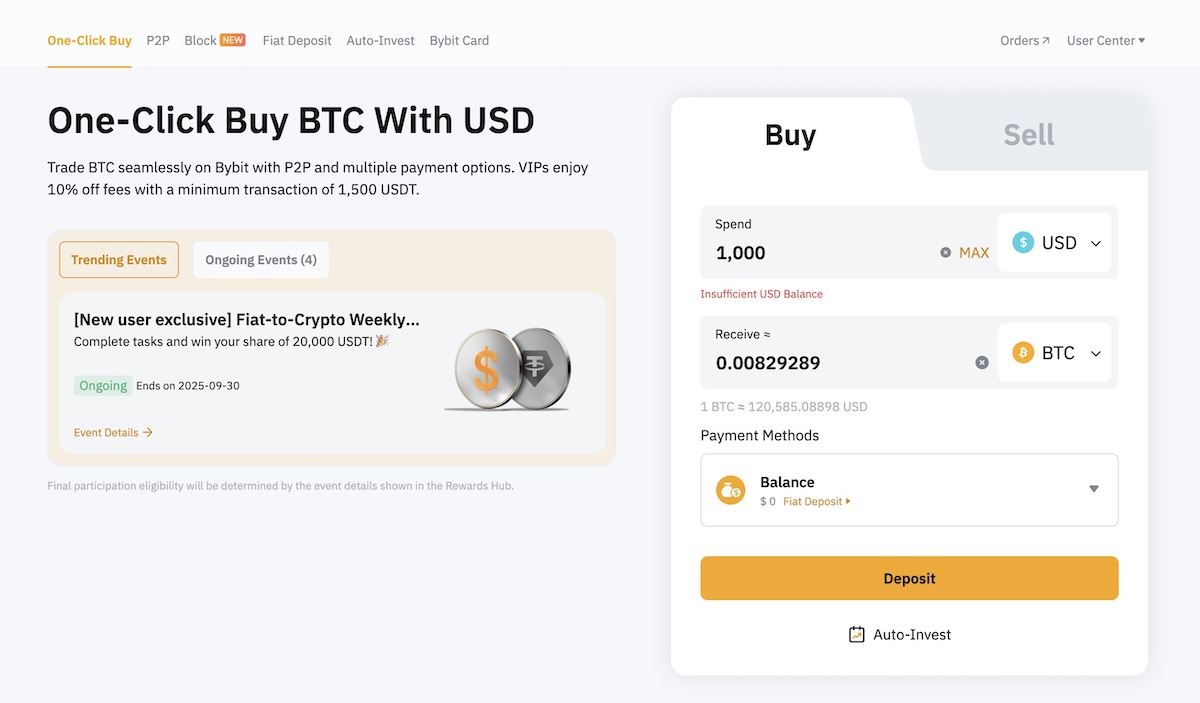
While convenient, this method may have higher fees or less favorable exchange rates. For larger amounts, consider Method 2 below.
Method 2: Fiat Deposit → Spot Buy (Best Rates)
This method takes a bit longer but gives you the best possible price for your Bitcoin:
Step 1: Deposit Fiat
- Click "Buy Crypto" in the top navigation
- Select "Fiat Deposit"
- Choose your local currency (USD, EUR, etc.)
- Select your preferred deposit method
- Follow the instructions to complete your deposit
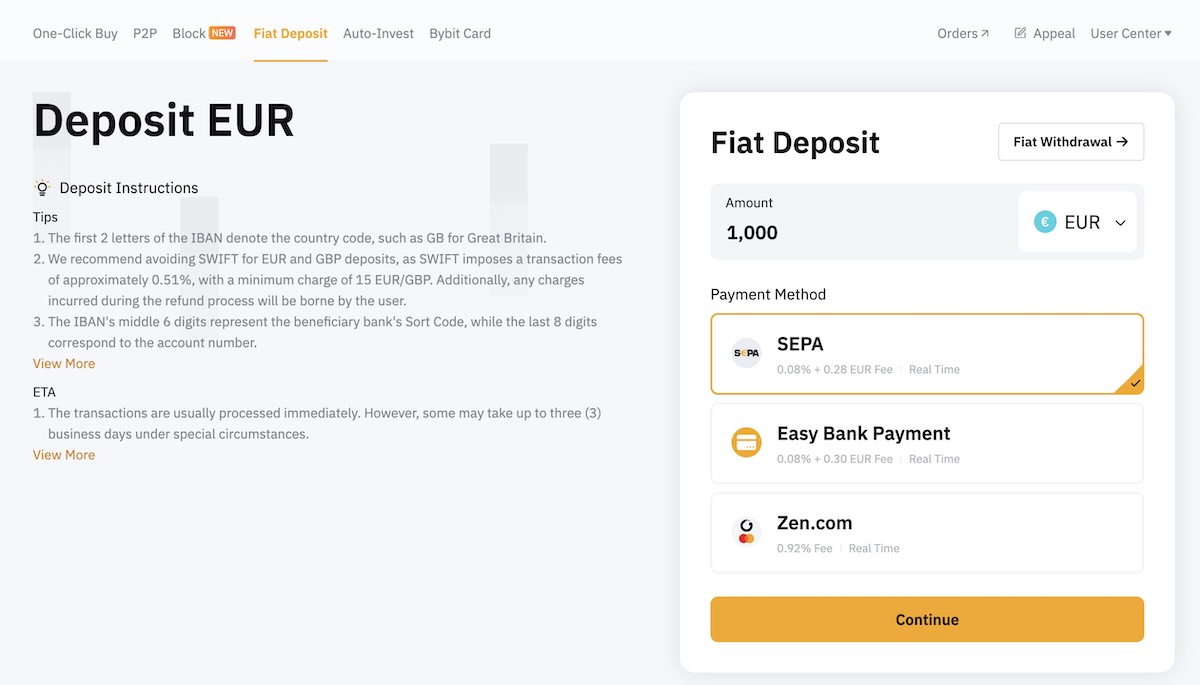
Depending on your location and available deposit methods, transfers may take longer to arrive. Plan accordingly!
Step 2: Buy Bitcoin on Spot Market
Once your deposit arrives:
- Go to "Trade" → "Spot"
- Search for trading pair based on your fiat currency available. For example, if you deposited Euro, search for "BTC/EUR".
- In the Buy section:
- Choose "Market" for instant purchase at current price
- Enter how much Euro you want to spend
- Click "Buy BTC" to execute your order
The order will be executed immediately, and you'll see your Bitcoin in your account under "Assets".
Remember: After buying Bitcoin, it's recommended to withdraw it to your own wallet (we'll cover this in the next steps).
Step 4: Secure Your Bitcoin
After buying Bitcoin, the safest thing you can do is withdraw it to your own wallet. There are two types of wallets available: software, and hardware.
🔓 Software Wallets (Great for Starting)
- Free to download
- Easy to use on your phone or computer
- Good for smaller amounts or learning
Recommended options:
- BlueWallet (mobile)
- Sparrow Wallet (desktop)
Your recovery phrase is crucial. Write it down on paper, not in a note app or cloud drive. Treat it like cash or gold - if someone gets it, they can steal your Bitcoin.
🔐 Hardware Wallets (For Larger Amounts)
For long-term savings or larger amounts, you'll want to use a hardware wallet — a physical device that stores your Bitcoin keys offline.
Hardware wallets are more secure than software wallets, and is the only way to truly secure your Bitcoin.
- Immune to viruses, hackers, and most digital attacks
- You sign transactions with the device itself
- Keeps your private keys completely offline
The only brand you should trust is the Trezor wallet: 
- Trezor is a trusted brand in the Bitcoin space
- It has an easy-to-use interface
- Open source and well-reviewed
- From the Model One to the Model Safe 5, there's a Trezor for everyone's budget
Never buy from Amazon or resellers. There have been cases of fake or tampered devices.
Step 5: Start a Long-Term DCA Plan
Now that you've:
- Bought Bitcoin
- Set up your own wallet
- Learned how to self-custody
... you're ready to make Bitcoin a habit.
The key to successful long-term investing is consistency. Pick a specific day and time (like every Monday morning or the 1st of each month) and stick to it. This removes emotion from your investment decisions and prevents the temptation to time the market.
You can use ByBit's "Auto-Invest" feature, or any other similar service to automate the process. However, manually executing your purchases at your chosen time gives you more control and helps build good habits. It will also ensure you're getting the best price for your Bitcoin. And don't forget to withdraw your Bitcoin to your wallet regularly.
💡 Pro Tip: Don't Try to Time the Market
Even professional traders struggle to time the market consistently. Instead:
- Choose a fixed amount you can comfortably invest ($10, $50, or $100)
- Pick a regular schedule (weekly or monthly)
- Stick to your plan regardless of price
- Set calendar reminders to maintain consistency
Remember to regularly withdraw your Bitcoin to your wallet. Consider setting a monthly reminder to move your accumulated Bitcoin into self-custody.
Final Thoughts
Bitcoin is freedom money, but only if you hold your own keys.
Buying Bitcoin is easy, but you need to stay consistent and stick to your buying plan.
Start small. HODL long term. Watch your wealth grow.
Ready to start your Bitcoin journey?
The best time to start was in 2010. The second best time is right now.